

Latest updates
Custom Checkboxes can now be displayed based on whether a customer’s cart contains a subscription product, making it easier to show subscription-specific agreements or messaging only when relevant.
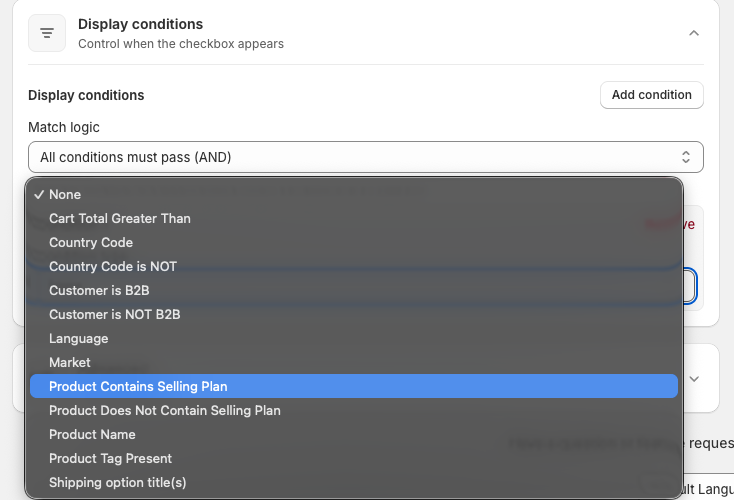
We’ve added a new display condition to Custom Checkbox!
You can now choose to display a custom checkbox only when a customer’s cart contains a subscription product.
This makes it easier to show subscription specific agreements, acknowledgements, terms, or messaging on your Shopify checkout only when they’re relevant to the customer’s order.
What’s New
A new Product Contains Subscription display condition is now available when configuring a Custom Checkbox.
Use it to create checkout experiences specifically for customers purchasing subscription products, without showing the checkbox to everyone else.
This feature is available now in Checkout Plus.
Added new horizontal and vertical scrollable layouts for Checkout Upsells, making it easier to showcase more product recommendations in a clean, space efficient design.

We’ve added a brand new Scrollable Layout option for Shopify Checkout Upsells, giving you more flexibility in how products are displayed to customers.
What’s New?
- Horizontal Scroll – Showcase multiple upsell products in a swipeable carousel that saves space while encouraging product discovery.
- Vertical Scroll – Display a scrollable list of upsell offers, making it easy to present more recommendations without overwhelming the checkout.
These new layouts help you feature additional products in a clean, modern format while maintaining a seamless Shopify checkout experience across desktop and mobile.
This feature is available now in Checkout Plus.
Control which products contribute toward your Free Shipping Progress Bar by excluding specific products or only counting items from selected collections and vendors. Create more targeted and flexible free shipping promotions.

Take full control over how your Free Shipping Progress Bar calculates progress toward free shipping.
With Advanced Product Conditions, you can now choose exactly which products contribute toward the free shipping threshold. Exclude specific products, only count items from certain collections, restrict qualifying products by vendor, and more.
This gives merchants greater flexibility to align free shipping promotions with their business goals while preventing low-margin or excluded products from impacting progress calculations.
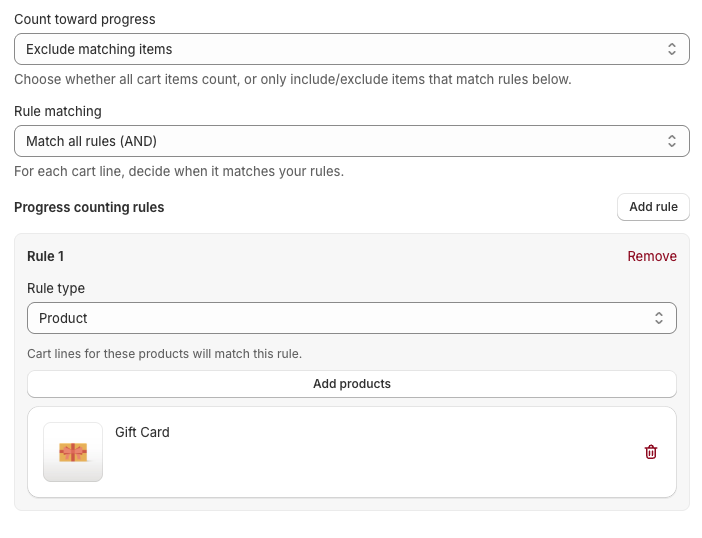
What’s New
- Exclude specific products from free shipping progress calculations
- Only count products from selected collections
- Only count products from selected vendors
- Create more targeted free shipping promotions
- Better control over qualifying cart value calculations
Whether you’re running brand-specific promotions, excluding certain products, or encouraging purchases from key collections, Advanced Product Conditions make your Free Shipping Progress Bar more flexible than ever.
This feature is available now in Checkout Plus.
Set different free shipping goals for each currency you support. Customers will automatically see the correct threshold based on their active currency, creating a more localized shopping experience and helping increase average order value across international markets.
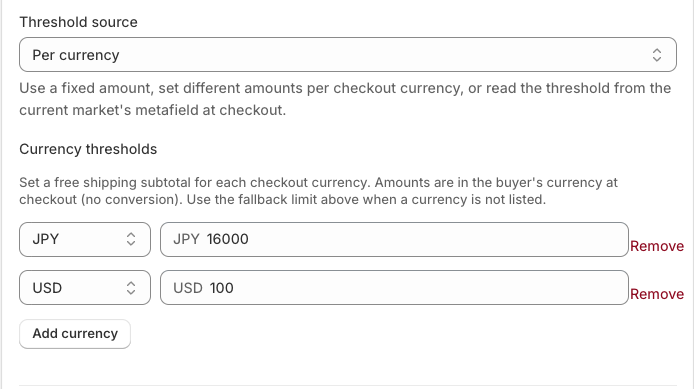
We’ve added support for currency-specific free shipping thresholds in the Free Shipping Progress Bar.
If you sell internationally, a single free shipping goal may not make sense across every market. With this update, you can now set different free shipping thresholds for each currency your store supports.
For example:
- USD: $75
- CAD: $100
- GBP: £60
- EUR: €70
- AUD: $120
Customers will automatically see the free shipping goal that matches the currency they’re shopping in, helping create a more localized shopping experience and encouraging higher order values across different markets.
Benefits
✅ Set unique free shipping thresholds for each currency
✅ Create a more localized customer experience
✅ Better align free shipping goals with regional pricing strategies
✅ Increase average order value across international markets
How to Get Started
- Open your Free Shipping Progress Bar settings.
- Configure a free shipping threshold for each supported currency.
- Save your changes.
The progress bar will automatically display the appropriate threshold based on the customer’s active currency.
This feature is available now in Checkout Plus.
Set a maximum total number of times a discount can be used across all customers.

You can now set a global usage limit for your Shopify discounts with Discount Plus.
This new setting allows you to control the total number of times a discount can be used across all customers, helping you manage limited-time promotions, exclusive campaigns, and inventory-sensitive offers with more flexibility.
Use cases
- Limit a promotion to the first 100 orders
- Create exclusive “limited redemption” campaigns
- Prevent overuse of high-value discounts
- Run flash sales with automatic cutoff limits
Global Usage Limits can be configured directly within your discount settings in Discount Plus.
New to Discount Plus? Try it free now!
Customers can now choose their free gift from multiple product options and select specific variants like size or color directly at checkout.

Free Gift With Purchase just got more flexible.
You can now offer multiple free gift options and allow customers to choose the exact product they want during checkout. Customers can also select product variants such as size, color, flavor, or style before the gift is added to their order.
Examples include:
- Choosing between multiple free gift products
- Selecting a shirt size and color
- Choosing different product variants for promotional items
- Offering more personalized gift experiences at checkout
This update gives merchants more control over gift campaigns while creating a better customer experience and reducing incorrect gift selections.
For more information click here to install the app here on the Shopify App Store!
Upsells now support subscription products.

Checkout Plus Upsells now support subscription products, allowing merchants to offer subscription-based upsells directly within the Shopify Checkout. Display and recommend subscription products alongside one-time purchase items to help increase recurring revenue and subscription conversions.
For more information click here to install the app here on the Shopify App Store!
Display reviews from our new integration partners directly in your Shopify checkout, post-purchase, and customer journey pages.

Checkout Plus now supports new review integration partners, Yotpo, Okendo and Judge.me making it easier than ever to display trusted customer reviews, star ratings, and social proof throughout your Shopify checkout experience. Showcase product reviews based on cart contents, upsells, recommended products, thank you pages, and order status pages to increase trust, improve conversions, and boost revenue.
For more information click here to install the app here on the Shopify App Store!
Without changing the title of your discount you can now provide a Discount Message for your automatic discounts


You can now provide a "Discount Message" that will override the discount title displayed at checkout. This allows for your Shopify discounts to have an internal title while still maintaining descriptive discount names at Checkout.
New to Discount Plus? Try it free now!
New Volume and Buy X Get Y product discount types are now available.

You can now create Volume discounts and Buy X Get Y product discounts into a single discount with Discount Plus. Offer tiered pricing based on quantity or incentivize larger purchases with flexible Buy X Get Y promotions in a single discount, giving you more control over how you drive conversions and increase AOV.
New to Discount Plus? Try it free now!
Line item messages can now display product metafields.

Line item messages can now dynamically display product metafields. This allows you to surface additional product information directly at checkout, creating more contextual and personalized messaging based on each item in the cart.
For more information click here to install the app here on the Shopify App Store!
Checkboxes can now be placed within the Shipping Options section.

You can now add checkboxes directly within the Shipping Options section at checkout. This new placement allows you to capture important selections or acknowledgments at a critical step in the customer journey, helping improve clarity, compliance, and overall checkout experience.
For more information click here to install the app here on the Shopify App Store!
Easily insert dynamic values into your custom banner messages in the custom banner settings.
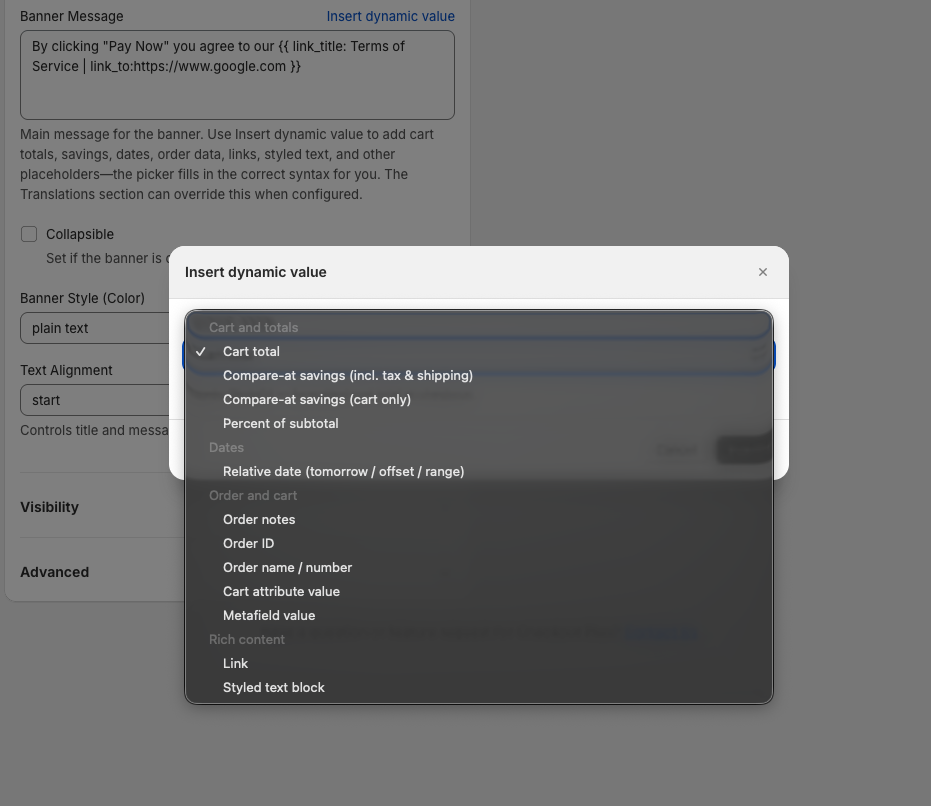
You can now easily insert dynamic values into your custom banner messages, making it faster to personalize content based on cart details, customer information, or order conditions. This update simplifies setup while helping you create more relevant and engaging messaging throughout the checkout experience.
For more information click here to install the app here on the Shopify App Store!
Exclude specific products or collections from appearing in your checkout upsells.

You can now exclude specific products or entire collections from your checkout upsells. This gives you greater control over which items are promoted, helping you avoid conflicts, prevent irrelevant recommendations, and create a more targeted upsell experience that drives higher conversions.
For more information click here to install the app here on the Shopify App Store!
Benefits, Reviews & Testimonials now feature a new paginated card layout, making it easier to showcase social proof within Shopify Checkout.
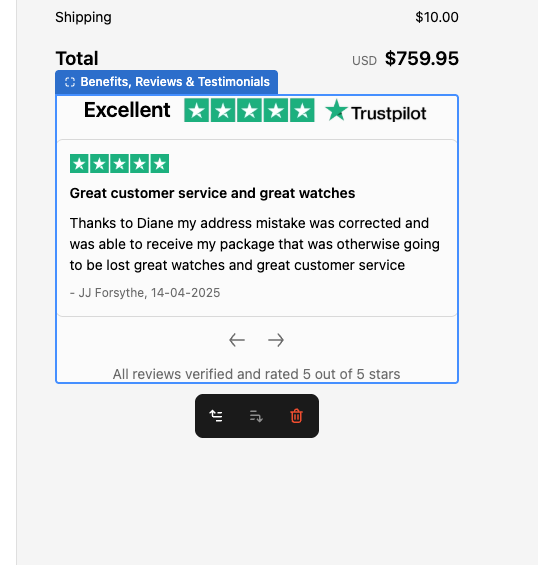
Checkout Plus now introduces a paginated card layout for Benefits, Reviews, and Testimonials in Shopify Checkout, allowing merchants to display social proof in a clean, organized, and scrollable format. Customers can easily browse multiple reviews and value propositions without overwhelming the checkout experience.
This update helps Shopify merchants build trust, increase conversions, and reduce checkout hesitation by highlighting customer feedback and key benefits in a structured way. The paginated layout is optimized for both desktop and mobile, ensuring a seamless and high-converting Shopify checkout experience.
For more information click here to install the app here on the Shopify App Store!
Shipping Customizations now include a Free Shipping Progress indicator, showing customers how close they are to qualifying for free shipping. Available for All Shopify Plans

Checkout Plus now supports a Free Shipping Progress indicator within Shipping Customizations for Shopify Checkout. Merchants can display dynamic messages that show customers how much more they need to spend to unlock free shipping, encouraging higher cart values before completing their purchase.
This feature helps Shopify merchants increase average order value (AOV), reduce cart abandonment, and improve conversion rates by motivating customers to add more items to their cart. Fully integrated with Shopify Checkout, the progress indicator updates in real time for a seamless and optimized checkout experience.
For more information click here to install the app here on the Shopify App Store!
Checkout Plus now supports Post Purchase Upsells and Call-to-Action page customizations, allowing merchants to promote products and guide customers to important actions immediately after checkout in Shopify.

Checkout Plus now includes new Post Purchase Upsells and Call-to-Action page customization options for Shopify Checkout. Merchants can display targeted product recommendations, promotional offers, and custom CTAs directly on the post-purchase page to capture customer attention after an order is completed.
This feature helps Shopify stores increase average order value (AOV), drive repeat purchases, and promote key actions such as account creation, product recommendations, or special offers. By customizing the post-purchase experience, merchants can turn completed checkouts into new conversion opportunities while maintaining a seamless Shopify checkout and post-purchase flow.
For more information click here to install the app here on the Shopify App Store!
Checkout Plus now features a newly redesigned app home page, making it easier to navigate features, access tools, and manage your Shopify checkout customizations.
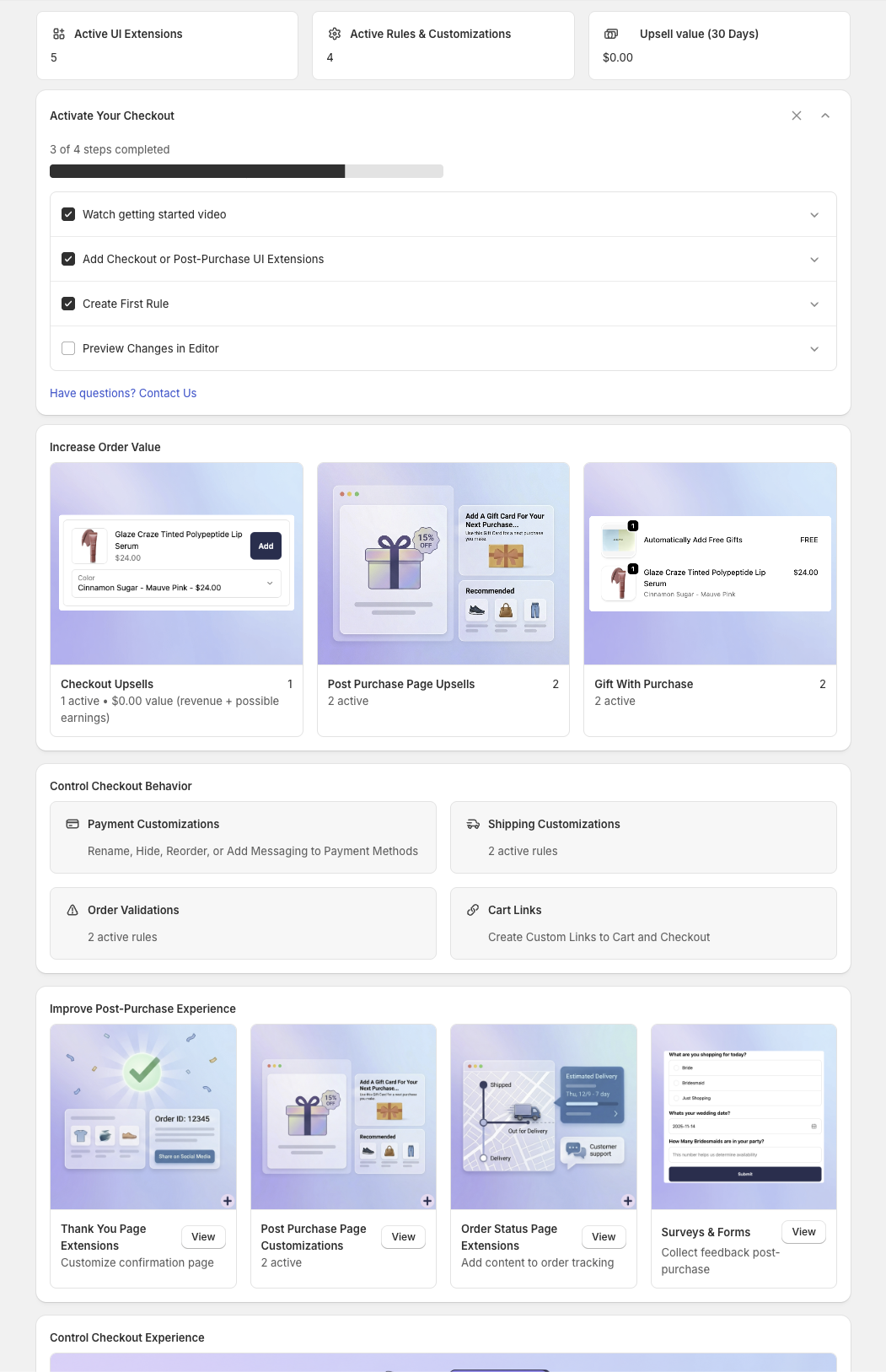
The Checkout Plus app home page has been completely redesigned to provide a faster and more intuitive experience for managing Shopify Checkout and Post Purchase customizations. The new layout improves navigation, surfaces key features more clearly, and helps merchants quickly access tools like upsells, order validations, shipping and payment customizations, and post-purchase extensions.
This redesign makes it easier for Shopify merchants to optimize their checkout, increase conversions, and manage checkout extensions from a single, streamlined dashboard. The updated interface also improves onboarding for new users and helps merchants quickly understand how to customize their Shopify Checkout, Thank You Page, and post-purchase experience.
For more information click here to install the app here on the Shopify App Store!
Discounts now support the ability to specify the start and end time of the Shopify discount compared to the previous ability to only select the date.
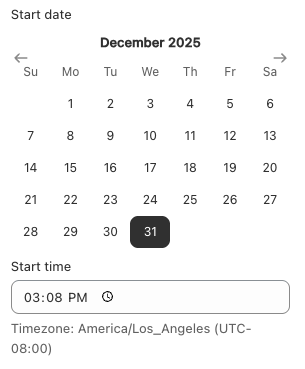
Discounts now support the ability to specify the starting and ending time for when the Shopify discount is active. You could previously specify only the date. This allows more granular control of when discounts start and end to line up better with planned promotions.
New to Discount Plus? Try it free now!
Discount Plus now supports an exclusive condition for returning customers, allowing you to reward loyal shoppers with targeted discounts. Easily apply discounts only to customers who have purchased before.
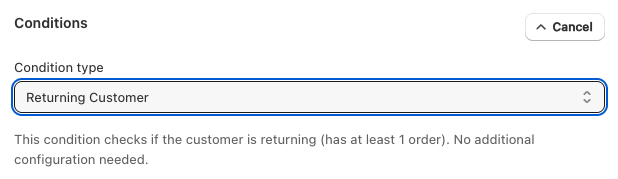
You can now create discounts that apply exclusively to returning customers in Discount Plus. This new condition makes it easy to reward loyal shoppers, encourage repeat purchases, and run retention focused promotions by ensuring discounts are only applied to customers with previous order history. Perfect for VIP offers, loyalty campaigns, and post-purchase incentives, no custom code required. Enjoy!
You can now set Customer Usage Limits and Customer Product Limits when creating discounts in Discount Plus.

You can now set Customer Usage Limits and Customer Product Limits when creating discounts in Discount Plus.
Limit how many times a discount can be used per customer and control how many products the discount applies to—giving you more control over promotions and protecting your margins.
Line item editing now supports a “Remove” button, allowing customers to easily remove products directly from Shopify Checkout.

Checkout Plus now adds support for a “Remove” button within line item editing in Shopify Checkout, giving customers a faster and more intuitive way to remove items during checkout. This improves the overall checkout experience by reducing friction and allowing shoppers to quickly update their cart without navigating away.
By enabling in-checkout item removal, merchants can improve user experience, reduce cart abandonment, and streamline the Shopify checkout flow. This enhancement aligns with Shopify’s latest checkout extensibility features, ensuring a smooth, responsive, and conversion-optimized experience.
For more information install the app here on the Shopify App Store!
Upsells now support a new carousel layout in Shopify Checkout, allowing multiple offers to be displayed in a swipeable format that improves visibility and keeps the checkout experience clean.
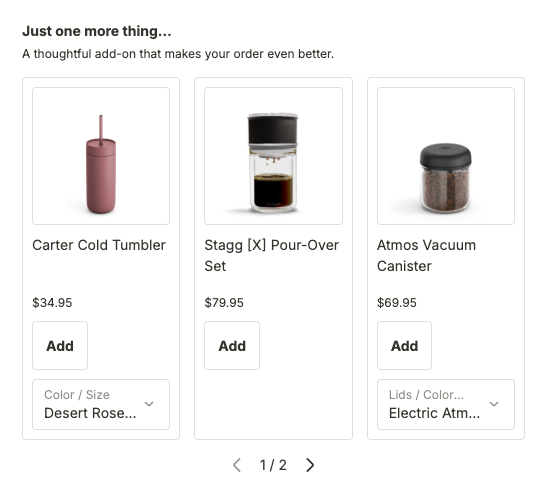
New Upsell Layout
Checkout Plus now includes a new carousel layout for upsells in Shopify Checkout, allowing merchants to display multiple product offers in a swipeable, space-efficient format. Customers can easily browse recommended products without disrupting the checkout flow.
The carousel layout improves upsell visibility, mobile usability, and conversion opportunities by showcasing multiple offers within a clean checkout interface. This enhancement helps Shopify merchants increase average order value (AOV) while maintaining a fast and optimized Shopify Checkout experience.
For more information install the app here on the Shopify App Store!
Order Validations can now enforce rules based on product quantity in cart. This allows merchants to require a minimum amount to be purchased or the opposite and set a maximum products that can be purchased per order in your Shopify Store
Maximum Limit Example Settings:

Maximum Limit Example Settings:
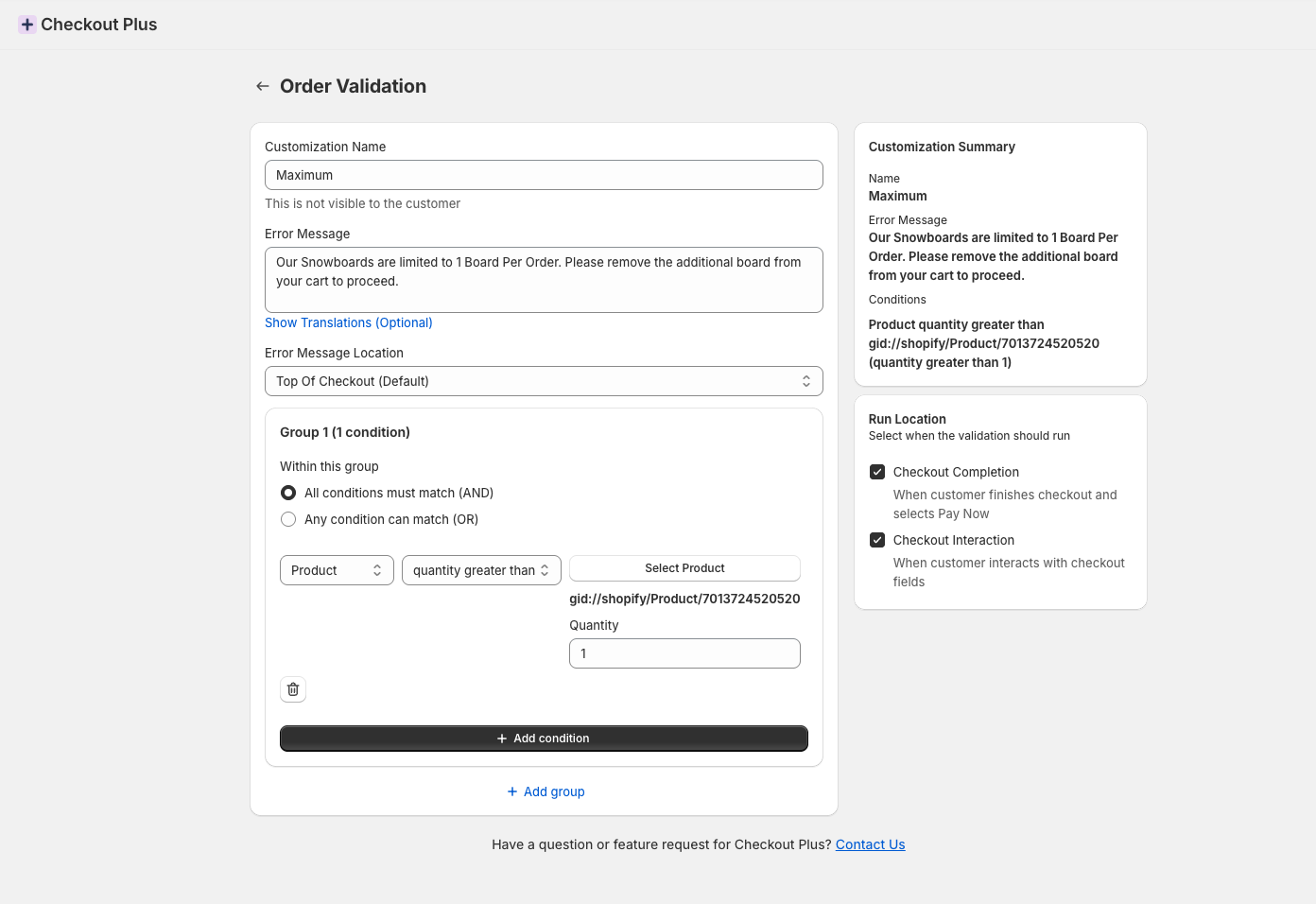
Minimum Limit Example:

Minimum Limit Example Settings:

For more information install the app here on the Shopify App Store!
The list of discounts has been updated to now have the ability to bulk toggle discounts to an Active or Inactive State
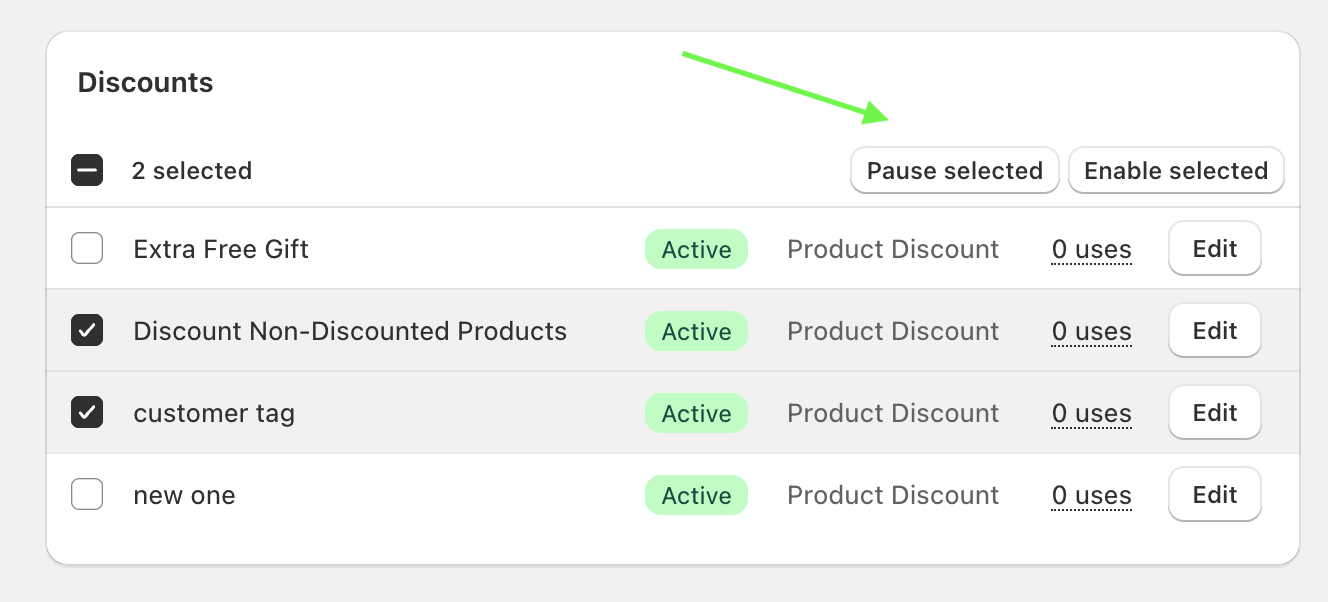
- General - The list of discounts has been updated to now have the ability to bulk toggle discounts to an Active or Inactive State
Upsell and Call-to-Action extensions can now be displayed in Shopify’s new Thank You Page Announcement Bar. This allows merchants to promote offers and drive additional actions directly within the announcement bar after checkout.
Collapsed Example With the Call to Action in the Shopify Announcement Bar
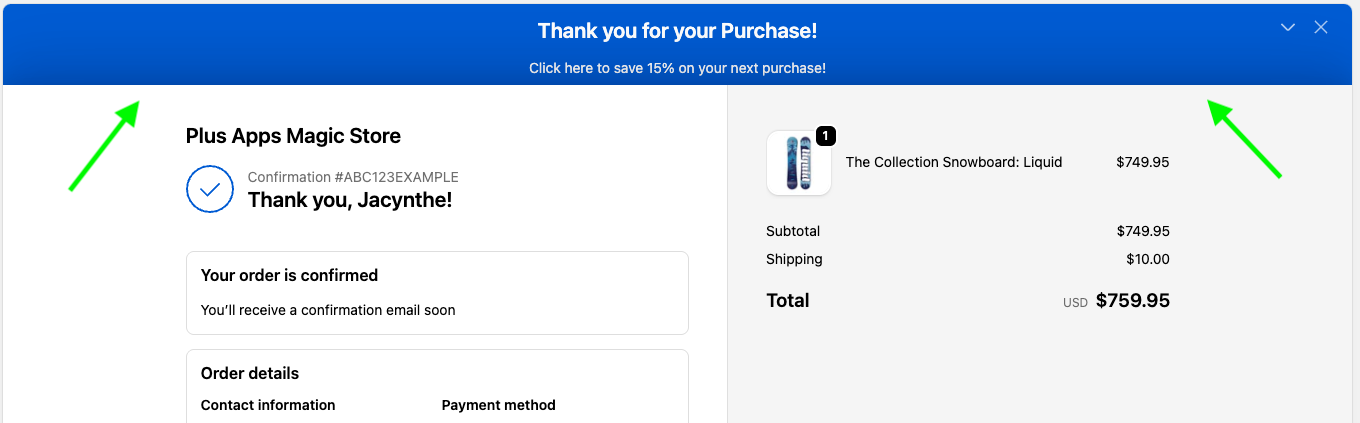
Expanded Example:
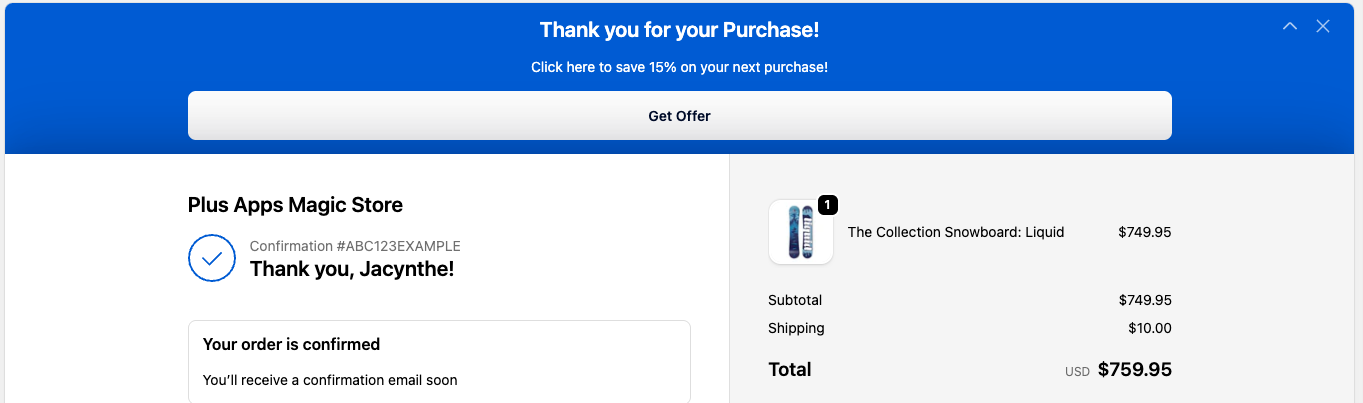
For more information install the app here!
Surveys & Forms can now be displayed on the Thank You and Order Status pages, allowing you to collect feedback and information after purchase in addition to the Shopify Checkout.
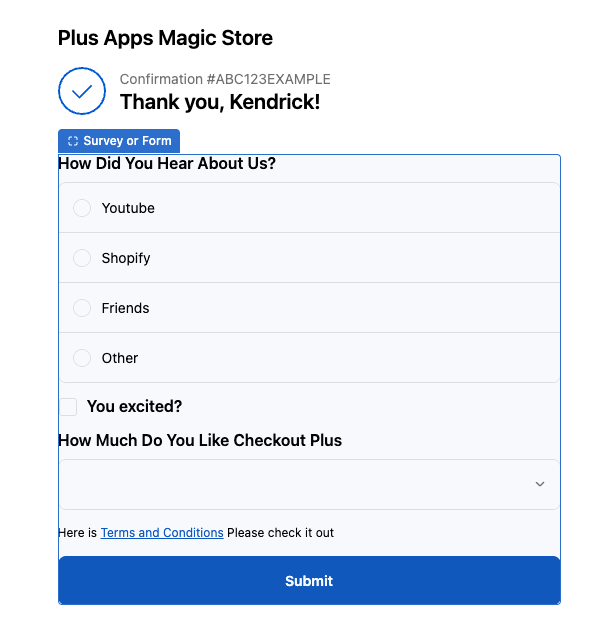
You can now place Surveys & Forms on the Thank You and Order Status pages, allowing you to engage customers post-purchase and gather valuable insights beyond the Shopify checkout experience.
New to Checkout Plus? Try it free now
We’ve added a new quantity selector and pagination to Upsells, making it easier for customers to choose how many items to add and browse through multiple offers smoothly at checkout.
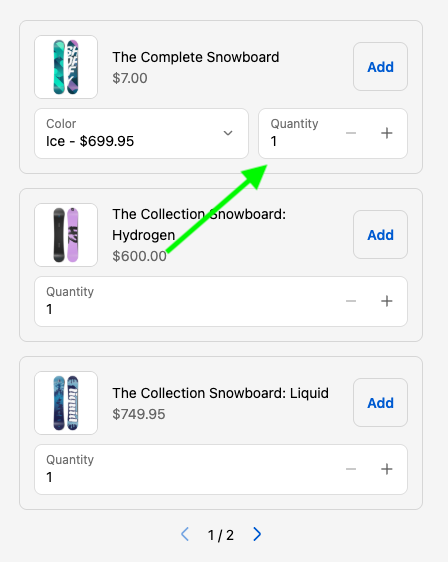
Quantity Selector
The newly added setting allows your Shopify store to offer the ability for customers at checkout to add multiples of the same product to the cart
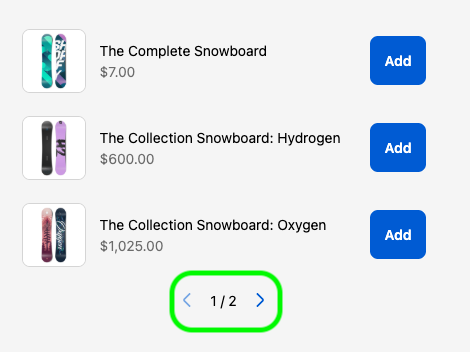
Pagination
Now, with pagination if you want to offer more upsells without taking up more room on your Shopify Checkout, you can by enabling the pagination setting for your Upsells!
New to Checkout Plus? Try it free now
The custom banner now supports a new dashed border style for your Shopify Checkout, Thank you, and Order status pages
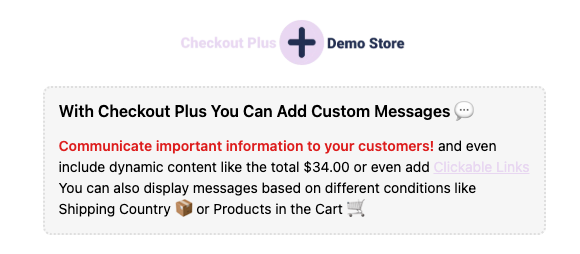
You can now easily select the new "Dashed" style under the "Banner Style" settings to access the new dashed border on the custom banner. This banner is available in the Shopify Editor for the Checkout, Thank you, and Order Status pages in the Checkout Plus app.
New to Checkout Plus? Try it free now
The Benefits List feature now supports an FAQ style layout, making it easier for shoppers to scan key information at a glance. Present benefits in a clean, collapsible format that keeps your Shopify checkout clear and organized.
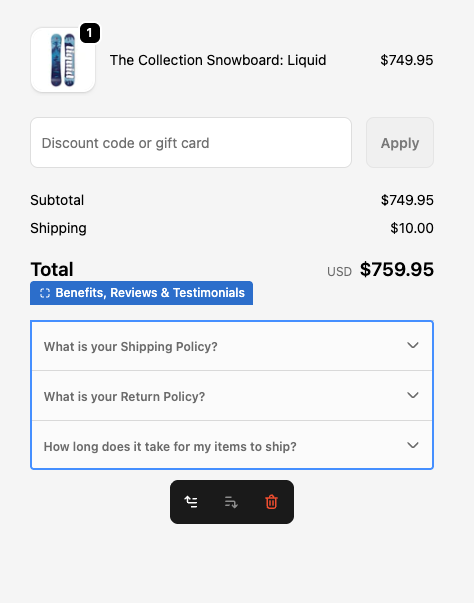
The Benefits List now includes an FAQ style layout option, allowing you to display key product or brand benefits in a clear, collapsible format. This layout helps reduce visual clutter on your Shopify Checkout while still giving customers quick access to important details, improving clarity, trust, and the overall checkout experience.
Order validation error messages can now be translated to better match your store’s language and customer experience. This update helps reduce confusion at checkout and improves clarity for international shoppers.
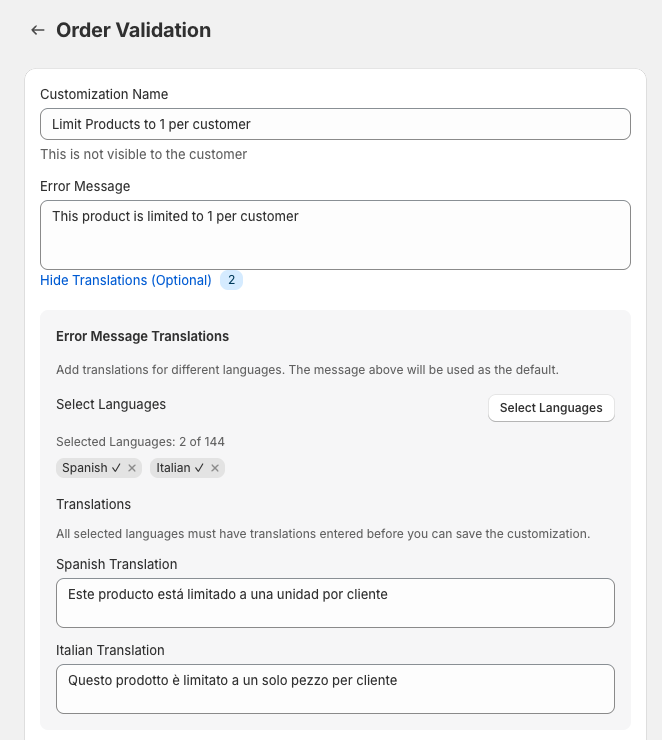
We’ve added translation support for Order Validation error messages, giving you more control over how checkout errors are displayed to customers. Error messages will now respect your store’s language settings, helping shoppers clearly understand what needs to be fixed before completing their order. This improvement is especially useful for international stores, multilingual checkouts, and merchants focused on creating a smoother, more localized checkout experience.
Upsells now support applying a discount code when the upsell product is added to the cart.
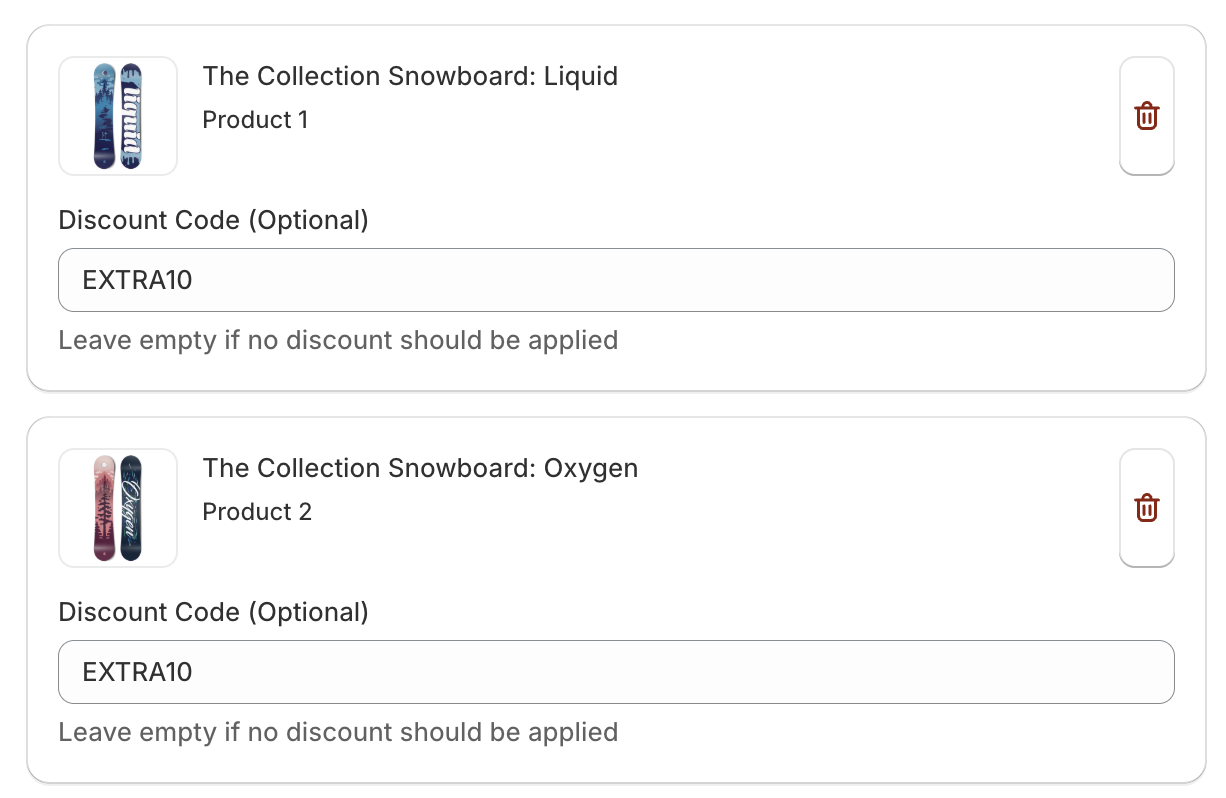
You can now apply a discount code to upsell products when they’re added to the cart—making it easier to offer special pricing and increase conversions.
New: Added a Date Picker form element to Surveys, allowing customers to easily select dates within your survey questions.

New: Added a Date Picker form element to Surveys, allowing customers to easily select dates within your survey questions.
The Shipping and Payment Customizations now allow you to hide, rename, and reorder options based on the Cart Attribute on the cart

The Shipping and Payment Customizations now allow you to hide, rename, and reorder options based on the Cart Attribute on the Shopify Cart. This can be useful for example when you have a product in the cart that is a custom order your can hide your express shipping options because that custom order will take longer to Ship.
We hope you find this useful and please reach out to us if you have any questions on how to use this. Thank you!
The Order ID and Order Number can now be accessed for Post Purchase customizations.
The Order ID and Order Number can now be accessed for Post Purchase customizations. This is useful for needing this ID or number for placing this information into URL redirects or for attaching these IDs to any sort of tracking or display reasons. The order ID can be accessed by typing {{order.id}} and the order number can be accessed by typing {{order.name}}

Please let us know if you have any questions on how to use this and thank you!
Interesting in Checkout Plus? Try it here now for free for 7 days
Translations & Localization - The Checkbox UI extension now supports translating the text fields displayed to the customer at Shopify Checkout in different languages
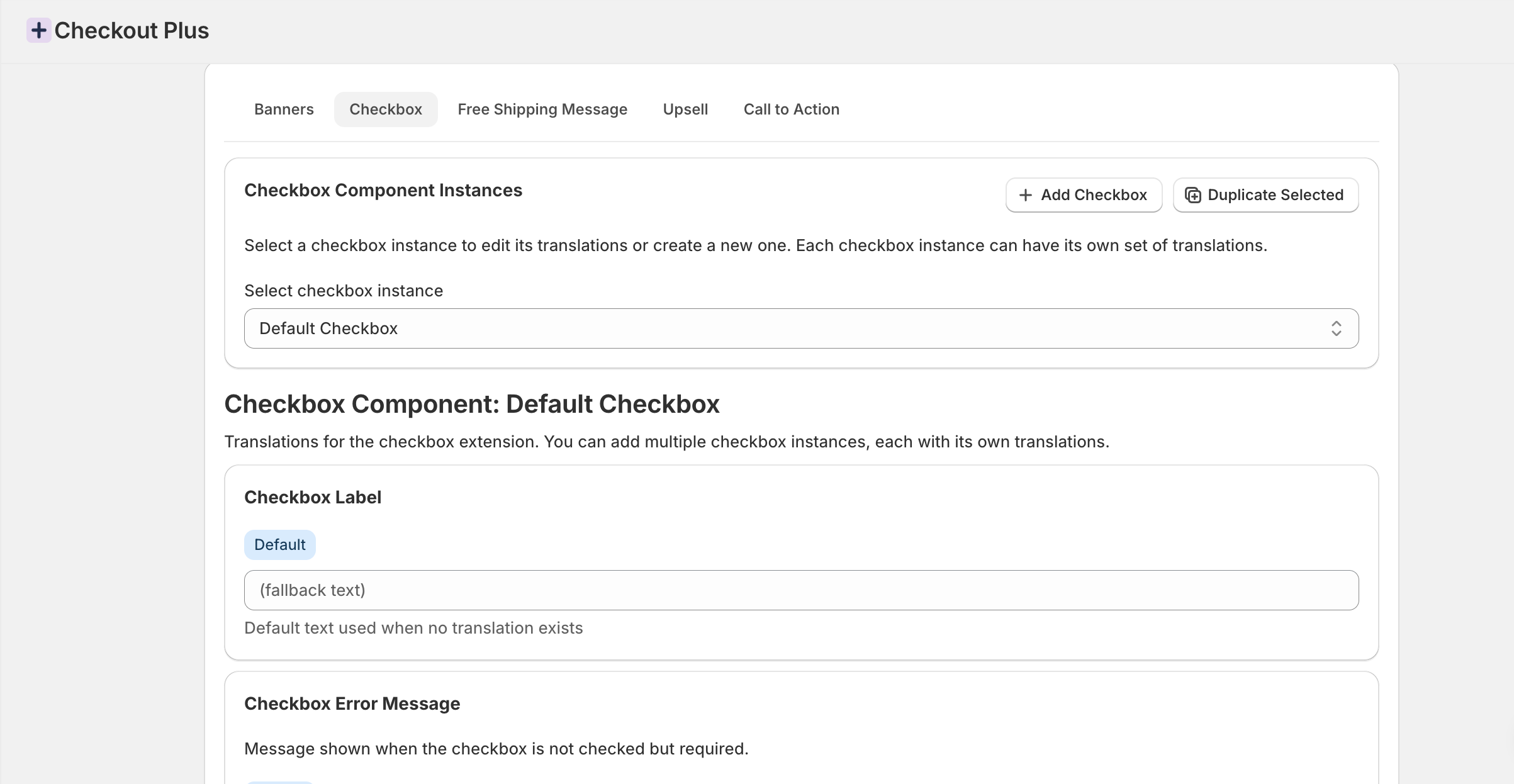
- Translations & Localization - The Checkbox UI extension now supports translating the text fields displayed to the customer at Shopify Checkout in different languages
Minor updates including the 'Product Attribute" condition for Shipping Customizations and Shipping Method Input Dropdown Option for your Shopify Checkout

- Shipping Customizations - Added a new condition to check for present product attributes for Shipping Customizations. This can be useful for when certain products with attributes can not be sent using a certain shipping option.
- Shipping Method Input - Added a new dropdown option to allow a prefixed list of options to select from on Shipping methods
You can now add custom reviews in a scrollable carousel to help build social trust with your customers to improve conversion rates on your Shopify Checkout

- Checkout Reviews - You can now add custom reviews in a scrollable carousel to help build social trust with your customers to improve conversion rates on your Shopify Checkout
Upsells now support the ability to sort multiple upsells on the Shopify Checkout to be sorted and displayed first based on the priority level

- Upsells - When there are multiple active upsells that meet the conditions configured in the Checkout Plus app the Upsells are now sorted based on the priority to display the more relevant upsells first
The Shipping Customization now supports the ability to rename, hide or reorder your Shipping Methods on your Shopify checkout based on the products in the cart
- Shipping Customizations - Product in cart condition. This allows the Shipping customizations for your Shopify Checkout to rename, hide or reorder based on the product in the customers cart. This is useful in some examples where very heavy products may not be available for all shipping options or products that have a longer fulfillment time do not have the option for express shipping, or at least you may want to display a message in the shipping method that the delivery time may be longer
The Thank You Page Now Supports the placement of multiple new UI extensions such as Benefits List, Line Item Messages, and Trust Badges
- Thank You Page - You can now place Trust Badges, Line Item Messages, and Benefits Lists on your Shopify Thank You Page
Minor updates to the Custom Button, Upsells, Custom Banner to further customize your Shopify Checkout with Checkout Plus
- Custom Button - The custom button has been updated to allow placement on the Order Status Page
- Upsells
- The compare at price and now be conditionally displayed on upsells
- Upsell images are also conditionally clickable to go to the product page if the customer wants more information
- Custom Banner - The display condition for Product IDs now supports a comma seperatted list so you can add more than one product as a display condition
You can now create rules in Checkout Plus to prevent shipping to specific countries based on conditions like cart total, products, or customer tags. Perfect for limiting delivery zones, reducing fraud, or enforcing regional restrictions directly in your Shopify Checkout.

You can now use Checkout Plus to automatically block orders shipping to specific countries based on your chosen conditions in your Shopify Checkout— such as cart contents, customer tags, or total order value.
This new Order Validation rule lets you define when and where an order can be shipped, helping you stay compliant with regional shipping restrictions, reduce fraud, or limit delivery zones for certain products.
To get started, go to your Order Validations section in Checkout Plus and add a new rule:
- Choose “Shipping Country” as the validation condition
- Select one or more countries to restrict
- Add optional conditions (e.g., “only block if cart total < $50”)

Example use cases:
- Block orders to countries where you don’t ship certain items
- Prevent high-risk regions during BFCM
- Restrict low-value orders from international buyers
The Line Item UI Extension has been updated to include the ability to display the variant selection options

- Line Item Quantity & Variant Selector - The optional setting adds a Variant selector if other variants are present on your products in the Shopify Checkout. This can be useful for providing customers the ability to update their cart without needing to leave the checkout
The display condition for discount codes now supports a comma separated list i.e. Discount1,Discount2,Discount3
- Custom Banner - The display condition for discount codes now supports a comma separated list i.e. Discount1,Discount2,Discount3
- Delivery Instructions - New supported location on Checkout. Can now be placed above the discount area on the Checkout
- Line Item Message - the display condition "Product Title" has been added to conditionally display the message based on the Product title
Upsells - Analytics have been added so you can now attribute which products on your Shopify Checkout are being added to the customer cart via the Upsells feature in the app. General information captured is the product sold and the amount of revenue generated.

New Feature: Upsells Analytics in Checkout Plus
We’ve added Upsells Analytics to Checkout Plus.
You can now track and attribute which products are added to the cart through Upsells in your Shopify Checkout. This feature provides clear insights into Upsell performance and helps you understand which items are driving conversions.
The analytics capture key data, including:
- Products sold via the Upsells feature
- Revenue generated from Upsell conversions
With these insights, you can measure the impact of Upsells in Shopify Checkout, optimize your offers, and maximize your store’s average order value (AOV).
Cart Links is a new feature introduced to offer merchants the ability to create premade Shopify carts as smart URL links that allow customers to click on the link and it automatically adds products to the cart and even applies discounts or customer information
- Cart Links - Cart Links is a new feature introduced to offer merchants the ability to create premade Shopify carts as smart URL links that allow customers to click on the link and it automatically adds products to the cart and even applies discounts or customer information
The line item message now supports the 'Language' display condition. This allows the message on the line item to conditionally display based on the Checkout Language
- Line Item Message - The line item message now supports the 'Language' display condition. This allows the message on the line item to conditionally display based on the Checkout Language
The Customer Tag has been added as a condition to limit Orders
- Order Validations - The Customer Tag has been added as a condition to limit Orders
- Delivery Instructions - A new Help Text setting has been added to provide help text when the instruction field is empty
A new checkout app block has been created to support displaying images and QR codes

- A new checkout app block has been created to support displaying images and QR codes
No updates match this filter.
Powerful Shopify apps built to help merchants sell more.

