Changelog
Custom Input validation now supports a character minimum or a min and max range, so you get more detailed answers at Shopify Checkout.
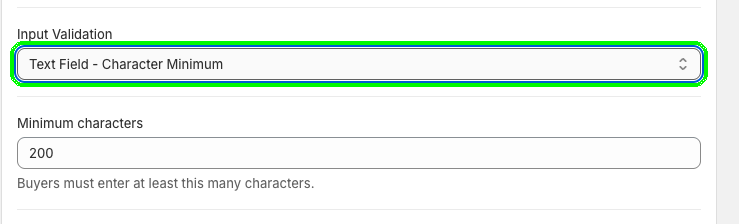
Custom Input in Checkout Plus can now require a character minimum, or keep answers within a min and max range. Before, you could only set a maximum.
That means more useful answers, like detailed gift messages, delivery notes, or survey responses. For example, set Minimum characters to 200 so buyers must enter at least 200 characters.
Find it in your Custom Input settings under Input Validation. Choose Text Field - Character Minimum and set Minimum characters, or pick the range option to set both a min and a max.
This update is available now in Checkout Plus. Open your Custom Input settings, pick an option under Input Validation, and get the detail you need.
Create a custom checkout and show the right message at the right time.
Open Checkout PlusBe the first to know about new features, improvements, and more.
Thanks, you're on the list.
Powerful Shopify apps built to help merchants sell more.



