Changelog
Checkout upsells can now be an upgrade that swaps a product in the cart for a new one, like a bigger set or a larger bottle.
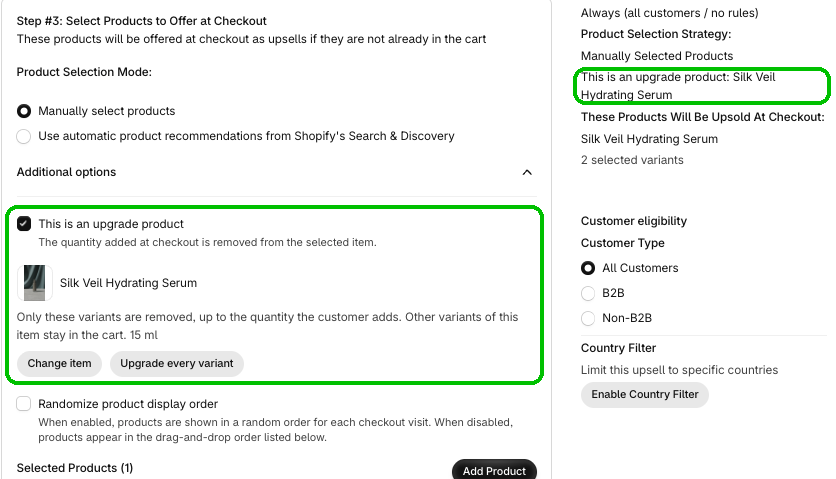
Checkout upsells can now offer an upgrade. Instead of adding another item, an upgrade swaps out one of the products in the cart for a new one.
In the Upsell Editor, open Additional options and check This is an upgrade product. Pick the item being upgraded and click Select, then add the upgrade with Add Product. When a shopper adds the upgrade at checkout, the quantity they add is removed from the item you picked. Only the variants you chose are removed, or click Upgrade every variant to cover them all.
It's a great fit for a step up, like going from an 8-piece set to a 10-piece set, or from a small bottle to a large bottle of a beauty product. Want to sweeten it? Check Apply a discount exclusive to the upsell.
This update is available now in Checkout Plus. Open Checkout Upsells, check This is an upgrade product, and give shoppers an easy step up.
Create a custom checkout and show the right message at the right time.
Open Checkout PlusBe the first to know about new features, improvements, and more.
Thanks, you're on the list.
Powerful Shopify apps built to help merchants sell more.