Home

/

Changelog

/

Discount Plus: Choose How Progressive Steps Apply For Shopify Discounts

Changelog

Discount Plus: Choose How Progressive Steps Apply For Shopify Discounts

Progressive Discount lets you stack steps in order or keep each step on the original price, so you control how rewards add up.

By Plus Apps

October 12, 2026

Discount Plus

V 1.12.0

Improved

Discount Plus How unlocked steps are calculated dropdown showing Apply steps in order and Each step uses the original price

‍

You now get to choose how a Progressive Discount handles a cart that unlocks more than one step. Just pick an option in How unlocked steps are calculated.

With Apply steps in order, your steps stack starting from the smallest unlock amount, and each one is calculated on what's left after the earlier ones. So $500 off comes first, then 50% off what remains. Prefer to keep every step on the same footing? With Each step uses the original price, each step is calculated on the original price instead.

More ways to fine-tune your steps

The same Step 4 setup gives you a few more dropdowns to shape how your steps work:
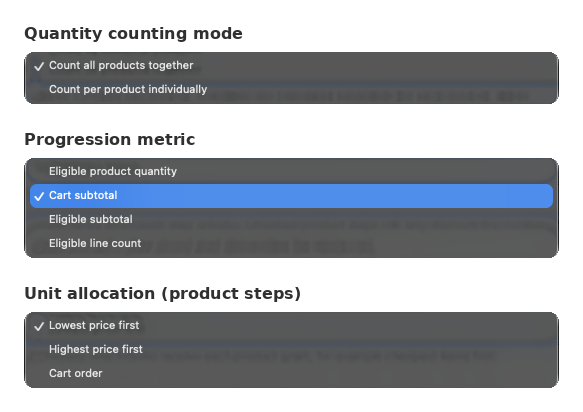
  • Quantity counting mode: pick Count all products together to add up quantities across all eligible products, or Count per product individually to count each product on its own.
  • Progression metric: decide what unlocks each step with Eligible product quantity, Cart subtotal, Eligible subtotal or Eligible line count.
  • Unit allocation (product steps): choose which items get each product step's discount with Lowest price first, Highest price first or Cart order.
Discount Plus Quantity counting mode, Progression metric and Unit allocation dropdowns with their options

‍

Not sure how it'll play out? The How this applies in the cart summary under your steps spells it out in plain words.

Discount Plus How this applies in the cart summary for progressive steps highlighted

‍

Why it helps
  • Stack discounts in order or keep each step on the original price
  • Unlock steps by quantity or by subtotal
  • Choose which items get the discount, like the cheapest first
  • See how your steps apply in plain words

‍

Building tiered offers? Try Discount Plus free!

Start using this feature today

Create a custom checkout and show the right message at the right time.

Open Checkout Plus

Was this update helpful?

YesNo

In this update

Related articles

Get product updates

Be the first to know about new features, improvements, and more.

Thank you! Your submission has been received!
Oops! Something went wrong while submitting the form.

Thanks, you're on the list.


