Changelog
Set different free shipping goals for each currency you support. Customers will automatically see the correct threshold based on their active currency, creating a more localized shopping experience and helping increase average order value across international markets.
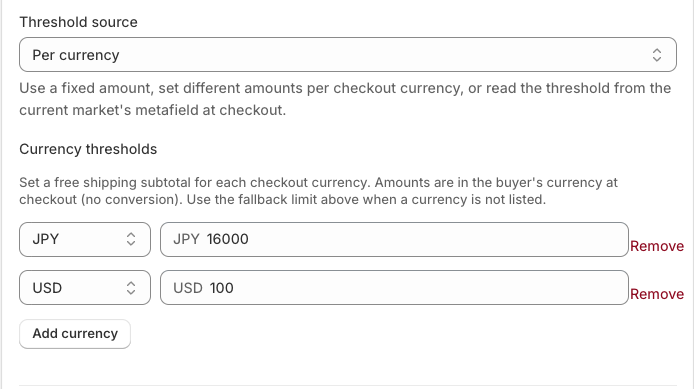
We’ve added support for currency-specific free shipping thresholds in the Free Shipping Progress Bar.
If you sell internationally, a single free shipping goal may not make sense across every market. With this update, you can now set different free shipping thresholds for each currency your store supports.
For example:
Customers will automatically see the free shipping goal that matches the currency they’re shopping in, helping create a more localized shopping experience and encouraging higher order values across different markets.
✅ Set unique free shipping thresholds for each currency
✅ Create a more localized customer experience
✅ Better align free shipping goals with regional pricing strategies
✅ Increase average order value across international markets
The progress bar will automatically display the appropriate threshold based on the customer’s active currency.
This feature is available now in Checkout Plus.
Create a custom checkout and show the right message at the right time.
Open Checkout PlusBe the first to know about new features, improvements, and more.
Thanks, you're on the list.
Powerful Shopify apps built to help merchants sell more.



