



Why Usage Limits Matter for Shopify Discounts
Unlimited discounts often lead to unintended consequences, including margin loss, abuse, and inconsistent customer experiences. Setting usage limits helps you:
- Prevent repeat abuse of promotional codes
- Protect profit margins on high-demand products
- Create fair, one-time offers for customers
- Control bulk buying behavior
- Run cleaner, more predictable promotions
With Discount Plus, these limits are easy to configure and fully compatible with Shopify Checkout.
Customer Usage Limit: Control How Often a Customer Can Use a Discount
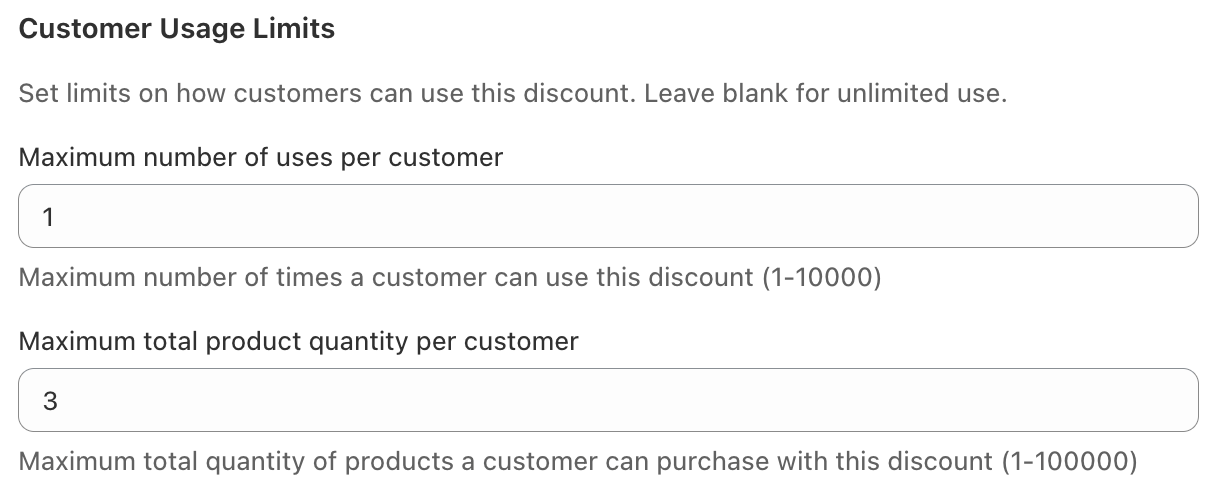
The Customer Usage Limit allows you to specify how many times an individual customer can use a discount.
How It Works
When creating a discount in Discount Plus, simply set a Customer Usage Limit, such as:
- 1 use per customer
- 2 uses per customer
- Any custom number you choose
Once a customer reaches their limit, the discount will no longer apply for them—even if the code is still active.
Common Use Cases
- One-time welcome discounts
- Loyalty rewards meant to be used once
- Influencer or referral codes shared publicly
- Preventing repeat use of high-value coupons
This ensures discounts stay fair and intentional, without requiring manual monitoring.
Customer Product Limit: Control How Many Products a Discount Applies To
The Customer Product Limit gives you control over how many products in an order can receive the discount.
How It Works
You can specify a maximum number of products that the discount can apply to per order or per customer. For example:
- Discount applies to only 1 product
- Discount applies to up to 2 items
- Limit discounts on bulk purchases
If the customer adds more products than allowed, the discount is automatically capped.
Common Use Cases
- “Limit 1 discounted item per customer” promotions
- Preventing bulk purchases at discounted prices
- Running controlled flash sales
- Protecting limited-stock or high-demand products
This feature is especially useful for brands selling physical goods where inventory or margins are tight.
Using Both Limits Together for Maximum Control
One of the most powerful aspects of Discount Plus is the ability to combine Customer Usage Limit and Customer Product Limit.
For example:
- A customer can use a discount once
- The discount applies to only one product
This setup is ideal for promotions like:
- “One-time 20% off, limit 1 item per customer”
- “Try it once” campaigns
- Limited-access discounts for VIP customers
Discount Plus automatically enforces these rules at checkout—no extra steps required.
Why Discount Plus Is the Best Way to Manage Shopify Discount Limits
Shopify’s native discount tools have limited control when it comes to advanced usage rules. Discount Plus fills that gap by giving merchants flexible, easy-to-use controls without complexity.
With Discount Plus, you get:
- Per-customer discount usage limits
- Per-product discount limits
- Seamless Shopify Checkout enforcement
- No scripts, hacks, or theme edits
- Reliable performance built on Shopify’s latest APIs
Final Takeaway
If you want smarter, safer, and more controlled discount campaigns, usage limits are essential.
With Customer Usage Limit and Customer Product Limit in Discount Plus, you can confidently run promotions that convert—without sacrificing control or margins.
Discount Plus gives you precision control over how discounts are used, who can use them, and how far they go.