




Please Note This Requires Access to the Shopify Checkout Editor By Being on Shopify Plus
If you prefer a video guide we also offer a video tutorial on how to achieve this as well
Step 1. Open the Checkout Editor and find the "Line Item Message" block under the order summary section and Add it to your Checkout

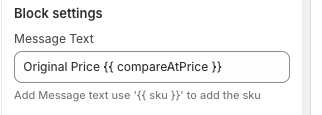
Step 2. Add the Compare at Price to the "Line Item Message" Settings
If you want the price to be displayed with a strikethrough then you will want to type {{ compareAt }} and if you prefer no strikethrough {{ compareAtPrice }}
Step 2a. Strikethrough


Step 2b. No Strikethrough

Step 3. Hide the text for products where the compare at price does not exist (Optional)

Step 4. Hit "Save" and you are all done!
Are you new to Checkout Plus