


A free gift is a nice way to say thanks during a sale. It also comes with a small risk: a shopper adds two or three of the gift product, and the order goes through anyway. That's a free gift leak, and it's easy to miss when orders pick up around Black Friday (November 27 this year).
Checkout Plus has a feature for exactly this, called Order Validations. You create rules that prevent an order from being completed when it doesn't meet your store's requirements. When a rule matches, checkout is blocked and the shopper sees an error message you write.
What you'll need
- Checkout Plus installed on your Shopify store
- A free gift promo to protect. If you still need to set one up, start with How to Schedule a Black Friday Free Gift for Bigger Carts with Checkout Plus.
- A few minutes to test checkout
How to limit a free gift to one per order
Step 1: Open Order Validations
In your Shopify admin, open Apps and then Checkout Plus. Under Rules & Customizations, select Order Validations.


Step 2: Name the rule and write the error
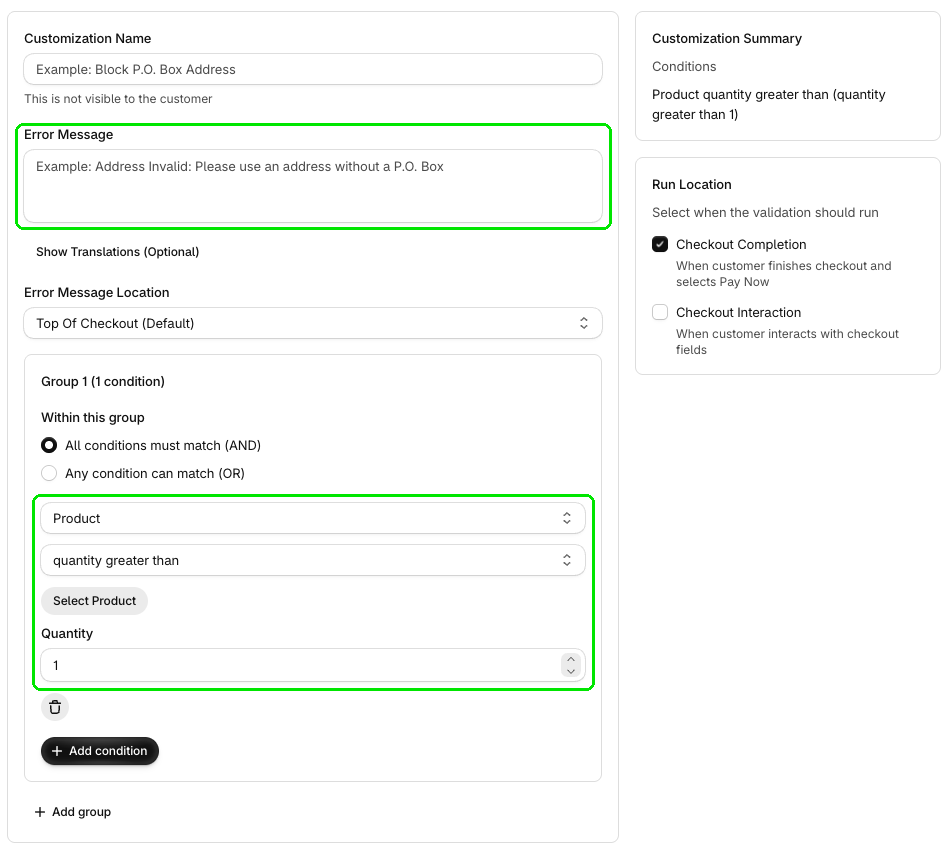
Add a Customization Name you'll recognize. Shoppers won't see it. In Error Message, write what shoppers should see, like "This gift is limited to one item per order". You can leave Error Message Location on Top Of Checkout (Default).
Step 3: Set the condition
In Group 1, set the condition to Product and quantity greater than. Click Select Product to choose your gift, then set Quantity to 1. Now, if the gift's quantity is greater than 1, checkout is blocked. One gift goes through as normal.
Step 4: Choose when it runs, then test
Under Run Location, pick Checkout Completion (when the customer finishes checkout and selects Pay Now), Checkout Interaction (when the customer interacts with checkout fields), or both. Check the Customization Summary, then place a test order with 2 of the gift to make sure it's blocked.
What shoppers will see
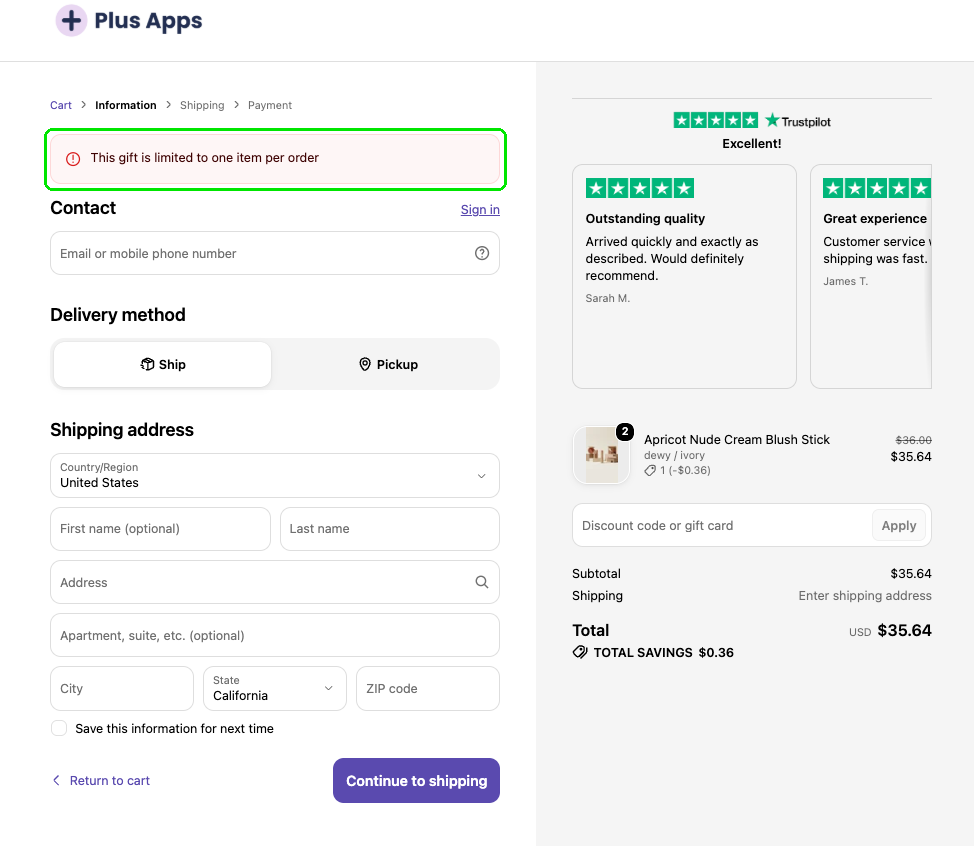
When the rule matches, shoppers see your message in a banner at the top of checkout. It tells them what to fix, so they can drop the gift to one and keep going.
Tips
- Keep the message clear. Say what's wrong and what to change in one short line.
- Test with 2 of the gift. It's the fastest way to confirm the rule works the way you expect.
- Pair it with your gift offer. Gift With Purchase adds the gift. Order Validations is the extra check that stops orders that shouldn't go through.
- Add more checks if you need them. Use + Add condition or + Add group to build on the rule.
- No Shopify Plus needed. Order Validations work without Shopify Plus. See which Checkout Plus features require Shopify Plus.
Wrapping up
A free gift should feel generous, not leaky. One Order Validations rule keeps your gift to one per order, with a clear message for shoppers when they go over. Set it up, test it with 2 of the gift, and you're ready for the rush. Don't have it yet? Get Checkout Plus on the Shopify App Store.