


Learn how to display Trustpilot reviews to boost customer confidence to help boost conversions in your Shopify Checkout. This tutorial will guide you through creating the reviews widget and selecting a layout that works for you on the checkout.

Learn How to display Trustpilot Reviews using Checkout Plus Reviews
This tutorial requires you to have knowledge of How to add Checkout Plus extensions in Shopify's Checkout Editor and to be on the 'Shopify Plus' plan if you plan to place this on the Checkout. All store plans can place this on the 'Thank you' and 'Order Status' pages.
Steps
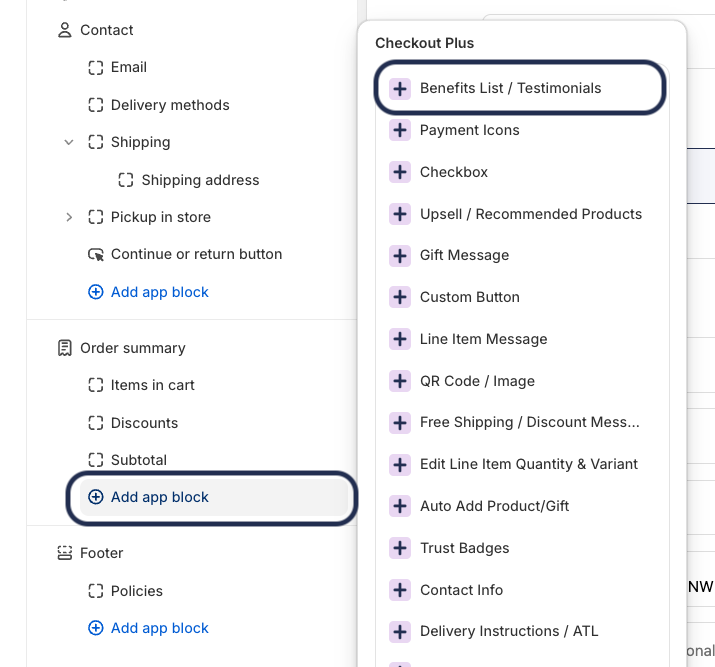
Step 1. Open the Checkout Editor & Add the 'Benefits List / Testimonials' Widget Block
Step 2. Configure the settings on the 'Benefits List / Testimonials' Widget Block
The key setting is to select the Layout Arrangement of Horizontal - Scrollable Cards this arrange ment will make it so the reviews are displayed horizontally in a scrollable block.

After selecting this setting provide the remaining review info such as the image, title, and testimonial. Here is an example of some settings for the widget:

Once you have done this select save and you are all done!
Here is a video of how to do this as well:
Interested in Checkout Plus? Try it for free now