
How to Hide Products on Shopify but Still Keep Them Available for Purchase Using Shopify's New “Unlisted” Status
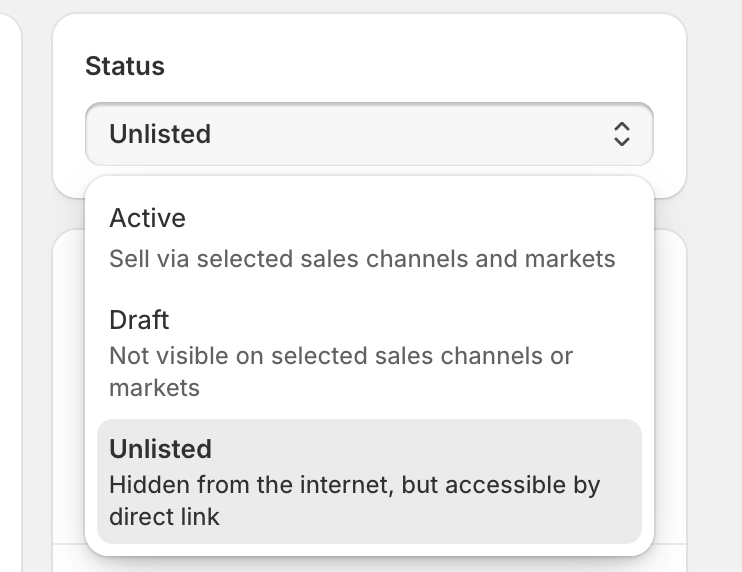
Shopify’s new Unlisted product status gives merchants more control over how products appear in their store. It lets you hide products from your storefront while still keeping them available for purchase through a direct link — perfect for exclusive offers, upsells, and free gifts.

What Is the “Unlisted” Product Status?
Shopify has recently introduced a new “Unlisted” product status, giving merchants more control over which products are visible on their storefront.
When a product is marked as Unlisted, it’s hidden from your online store search, collections, and search engine indexing, but remains available for purchase through a direct link.
In simple terms — it’s a product that customers won’t see while browsing your store, but they can still buy it if you share the link directly or trigger it through a checkout experience.
This is a powerful new feature for Shopify merchants who want to offer exclusive items, limited promotions, or special add-ons without cluttering their storefront or confusing shoppers.
Why “Unlisted” Is a Game-Changer for Checkout Customization
The Unlisted status is more than a visibility setting — it’s a tool that enables controlled selling.
It’s ideal for situations where you want to make certain products available only under specific conditions, such as through checkout-based promotions or post-purchase offers.
Before this feature, hiding products while keeping them purchasable often required awkward workarounds. Now, Shopify makes it simple — and with Checkout Plus, it becomes even more powerful.
Pairing “Unlisted” Products with Checkout Plus
Checkout Plus helps Shopify merchants take advantage of Unlisted products by surfacing them at the perfect moment — inside checkout or after purchase — where they’re most likely to convert.
Here are two effective ways to use this combination:
1. Free Gift Offers
With Checkout Plus, you can set conditions that automatically reveal or add Unlisted products as free gifts at checkout.
For example:
- Offer a free unlisted “Gift Box” when the customer’s total exceeds $75.
- Automatically include an unlisted “Bonus Sample” for new customers.
- Reward returning customers with hidden items not visible to the public.
Because these products are Unlisted, they won’t appear in your storefront or collections — keeping your catalog clean while still delivering personalized offers.
2. Discounted Upsells
You can also use Unlisted products as checkout or post-purchase upsells with a discounted price.
For example:
- Display an unlisted “Accessory Pack” as an upsell after the main item is added.
- Show a limited-time “Extended Warranty” at checkout with a discounted rate.
- Offer a hidden “Bundle Upgrade” only during checkout to boost AOV (Average Order Value).
By combining Unlisted products with Checkout Plus Upsell Rules, you create exclusive, time-sensitive offers that feel special — without ever showing those products publicly.
Key Benefits of Using Unlisted Products with Checkout Plus
- Clean, clutter-free storefront — keep hidden items off your product catalog.
- Seamless checkout promotions — reveal hidden products only under the right conditions.
- Increased AOV and engagement — use targeted upsells and gifts to drive more value per order.
- Simple setup — no coding or complex app configurations required.
Together, Shopify’s Unlisted status and Checkout Plus give merchants a smarter way to control visibility, create exclusivity, and personalize the checkout experience — all while maintaining Shopify’s secure and high-performance checkout.
Key Takeaway
Shopify’s new Unlisted product status opens the door to cleaner storefronts and more strategic selling opportunities. When paired with Checkout Plus, it becomes a powerful system for creating hidden offers, free gifts, and discounted upsells — exactly where they convert best: at checkout.